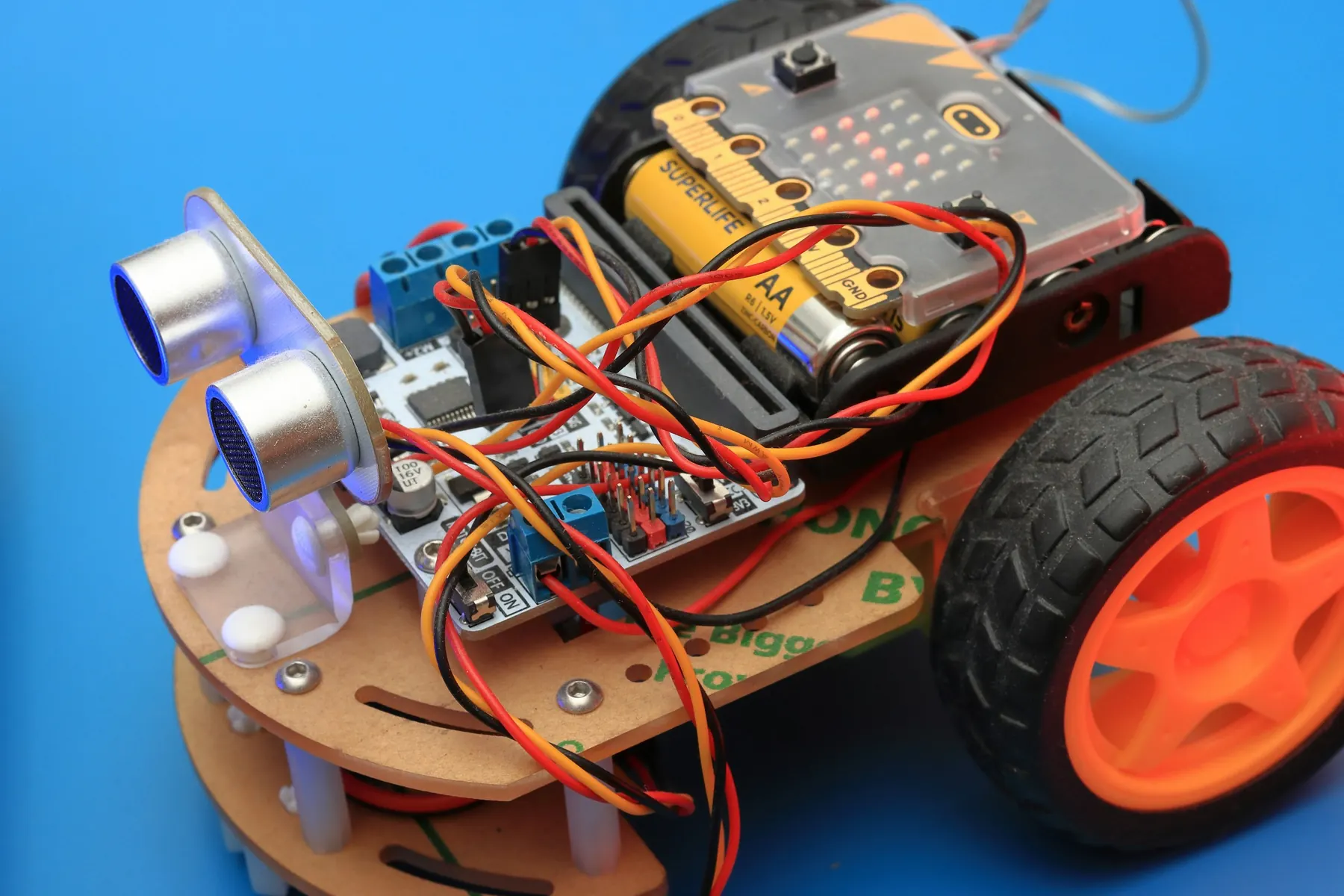
Combine & explain.Obstacle-Aware Security System
Multi-sensor systems, error analysis and responsible data use. Showcase build: an obstacle-aware system with object-classification advice and a manual approval gate.
- 16 projects8 robotics, 4 AI, 4 integrated
- 20 to 80Sessions by plan
- Arduino C/C++Main language
- Human in the loopAI to hardware
What students do, and what they prove.
Obstacle-Aware Security System
An obstacle-aware system with object-classification advice and a manual approval gate.
Learning check. Explain multi-sensor decisions and measure exactly where a classifier fails.
Individual check. Every learner, on their own: “Explain a false alarm.”
Entry task
Use variables and if/else, and build a sensor-to-output circuit.
Robotics core
Ultrasonic distance, motion sensing, LCD displays, Boolean logic, calibration and state diagrams.
AI layer
Data quality, false alarms and misses, confidence thresholds and the everyday limits of AI.
Code & tools
Arduino C/C++ with block-based data activities. Arduino IDE, Tinkercad, Teachable Machine, Local data tables.
Cross-subject link
Distance, percentages, AND/OR logic and error counts.
Scaffolding
Truth tables and modular starter code. Models classify objects, never people.
How AI meets hardware here
Human-mediated AI decisions first. A trainer-reviewed serial link only as an extension.
Sixteen projects, four blocks of twenty sessions.
Each block follows the same pattern: two builds, one AI project, then one integrated project. Open any project to see its five sessions.
- RRobotics
- AAI
- IIntegrated
- 01Ask & understand · Week 1Ultrasonic timing and distance
- 02Build & design · Week 1Connect sensor and serial display
- 03Implement · Week 2Add distance-triggered LED logic
- 04Test & improve · Week 2Calibrate against a ruler
- 05Explain & reflect · Week 3Report measurement error
UNO, HC-SR04, LED, resistor, ruler
Five known distances with repeated readings.
A physical circuit, sensor or mechanism, built and tested on the bench.
- 06Ask & understand · Week 3PIR and ultrasonic inputs
- 07Build & design · Week 4Build an AND/OR truth table
- 08Implement · Week 4Program a two-sensor alert
- 09Test & improve · Week 5Test false triggers and reset behaviour
- 10Explain & reflect · Week 5Explain each state in a diagram
UNO, PIR, HC-SR04, buzzer/LED
All four input combinations plus a reset test.
A physical circuit, sensor or mechanism, built and tested on the bench.
- 11Ask & understand · Week 6Classification and non-personal data
- 12Build & design · Week 6Collect two object classes and an other class
- 13Implement · Week 7Train a no-code image model
- 14Test & improve · Week 7Test changes in background and distance
- 15Explain & reflect · Week 8Write a simple model card
Computer, camera aimed at objects, model tool
Fifteen held-out images; report errors by class.
A model, an evaluation study or an AI-checking workflow.
- 16Ask & understand · Week 8Define parcels as objects, not identities
- 17Build & design · Week 9Map model advice to approved gate positions
- 18Implement · Week 9Build a manual approval/neutral interface
- 19Test & improve · Week 10Test unusual packaging and wrong predictions
- 20Explain & reflect · Week 10Demonstrate a refusal and correction
P03 model, UNO, servo, button, external supply
Ten object cases and three neutral/refusal tests.
The AI suggests. A person checks and operates the hardware.
- 21Ask & understand · Week 11LCD interface and pin mapping
- 22Build & design · Week 11Format distance measurements
- 23Implement · Week 12Build a live display with a valid-range message
- 24Test & improve · Week 12Test no-echo and out-of-range readings
- 25Explain & reflect · Week 13Explain the displayed limitations
UNO, HC-SR04, LCD, compatible interface/contrast parts
Five distances and two missing/invalid input cases.
A physical circuit, sensor or mechanism, built and tested on the bench.
- 26Ask & understand · Week 13Combine light and motion
- 27Build & design · Week 14Choose thresholds with a truth table
- 28Implement · Week 14Program auto and manual modes
- 29Test & improve · Week 15Test timer reset and manual override
- 30Explain & reflect · Week 15Explain why automation is not inherently AI
UNO, PIR, LDR, LED, button
Four input combinations plus timer and override tests.
A physical circuit, sensor or mechanism, built and tested on the bench.
- 31Ask & understand · Week 16What model scores do and do not mean
- 32Build & design · Week 16Record predicted labels and confidence scores
- 33Implement · Week 17Compare two acceptance thresholds
- 34Test & improve · Week 17Count false accepts and false rejects
- 35Explain & reflect · Week 18Choose an abstain rule and justify it
P03 model, held-out images, local table
Twenty test cases; never label confidence as guaranteed probability.
A model, an evaluation study or an AI-checking workflow.
- 36Ask & understand · Week 18Classify clean object samples
- 37Build & design · Week 19Plan a gate for two materials and unknown
- 38Implement · Week 19Route model decisions through a human approval step
- 39Test & improve · Week 20Test the selected confidence rule
- 40Explain & reflect · Week 20Explain model and mechanism limits
Servo rig, cardboard chute, P07 threshold findings
Twelve trials including three unknown objects.
The AI suggests. A person checks and operates the hardware.
- 41Ask & understand · Week 21Proximity and audible feedback
- 42Build & design · Week 21Map distance bands to buzzer behaviour
- 43Implement · Week 22Add LCD status messages
- 44Test & improve · Week 22Test near, far and invalid readings
- 45Explain & reflect · Week 23Document a useful range
UNO, HC-SR04, buzzer, LCD
Five distances; missing echo must not indicate safe travel.
A physical circuit, sensor or mechanism, built and tested on the bench.
- 46Ask & understand · Week 23Events versus continuous sensor states
- 47Build & design · Week 24Debounce or re-arm a detection
- 48Implement · Week 24Count object entries once per event
- 49Test & improve · Week 25Test slow, repeated and overlapping objects
- 50Explain & reflect · Week 25Explain why a simple counter can miss events
UNO, HC-SR04, LCD, buttons
Ten single entries plus three edge cases; no people surveillance.
A physical circuit, sensor or mechanism, built and tested on the bench.
- 51Ask & understand · Week 26Claims and reference evidence
- 52Build & design · Week 26Write a reusable checking recipe
- 53Implement · Week 27Review teacher-generated sensor explanations
- 54Test & improve · Week 27Test it on an intentionally unsupported claim
- 55Explain & reflect · Week 28Save a revised recipe and worked example
Teacher AI/printed responses, datasheet excerpts
Three explanations; trace at least five claims to evidence.
A model, an evaluation study or an AI-checking workflow.
- 56Ask & understand · Week 28Convert model output into a short label
- 57Build & design · Week 29Add clear unknown and error messages
- 58Implement · Week 29Connect the label to a manually updated LCD demo
- 59Test & improve · Week 30Test unreadable/uncertain inputs
- 60Explain & reflect · Week 30Explain data movement and permissions
P03 classifier, LCD rig, teacher serial demonstration optional
Ten cases; unknown remains distinct from a negative class.
The AI suggests. A person checks and operates the hardware.
- 61Ask & understand · Week 31Finite states and elapsed time
- 62Build & design · Week 31Write a timer state diagram
- 63Implement · Week 32Program light-on and timeout behaviour
- 64Test & improve · Week 32Test repeated triggers without long blocking delays
- 65Explain & reflect · Week 33Explain the difference between a timer and a model
UNO, PIR, LED, button
Five timed runs; manual off works during the timer.
A physical circuit, sensor or mechanism, built and tested on the bench.
- 66Ask & understand · Week 33Define a safe model-only use case
- 67Build & design · Week 34Integrate distance, motion, light and display
- 68Implement · Week 34Program clear alert and reset modes
- 69Test & improve · Week 35Run a combined sensor test table
- 70Explain & reflect · Week 35Present a labelled system diagram
Grade 7 kit; approved servo supply if gate is included
Eight defined scenarios with expected versus actual results.
A physical circuit, sensor or mechanism, built and tested on the bench.
- 71Ask & understand · Week 36Who a model is for and not for
- 72Build & design · Week 36Document dataset origin and labels
- 73Implement · Week 37Add error examples and privacy restrictions
- 74Test & improve · Week 37Peer-review claims against test records
- 75Explain & reflect · Week 38Publish a concise responsible-use card
Prior model, test log, model-card template
Every performance statement matches a recorded test.
A model, an evaluation study or an AI-checking workflow.
- 76Ask & understand · Week 38Separate perception, rules and actuation
- 77Build & design · Week 39Add object-type advice to the sensor system
- 78Implement · Week 39Require a person to approve physical gate decisions
- 79Test & improve · Week 40Test sensor/model conflict and unknowns
- 80Explain & reflect · Week 40Present both system and model evidence
P14 core, object classifier, computer, manual controls
Twelve integrated scenarios; no face recognition or real access control.
The AI suggests. A person checks and operates the hardware.
Class 7 adds one more layer of judgement.
Multiple inputs, states and calibration
Errors, unknowns and evidence
Arduino functions and Boolean logic
A recipe with evidence rules and unknown cases.
Read an extension's source, purpose and permissions first.
An evidence-check checklist.
 For school leaders
Bring Class 7
to your school.
Start with the four Discovery projects for Class 7 (20 sessions), review the evidence together, then extend to Builder or Innovation.
- Prospectus and class-wise plan
- Kit and readiness check
- Pilot one class first
- Evidence at every milestone
Let's plan your pilot.
Share a few details and we will send the right plan for your classes.