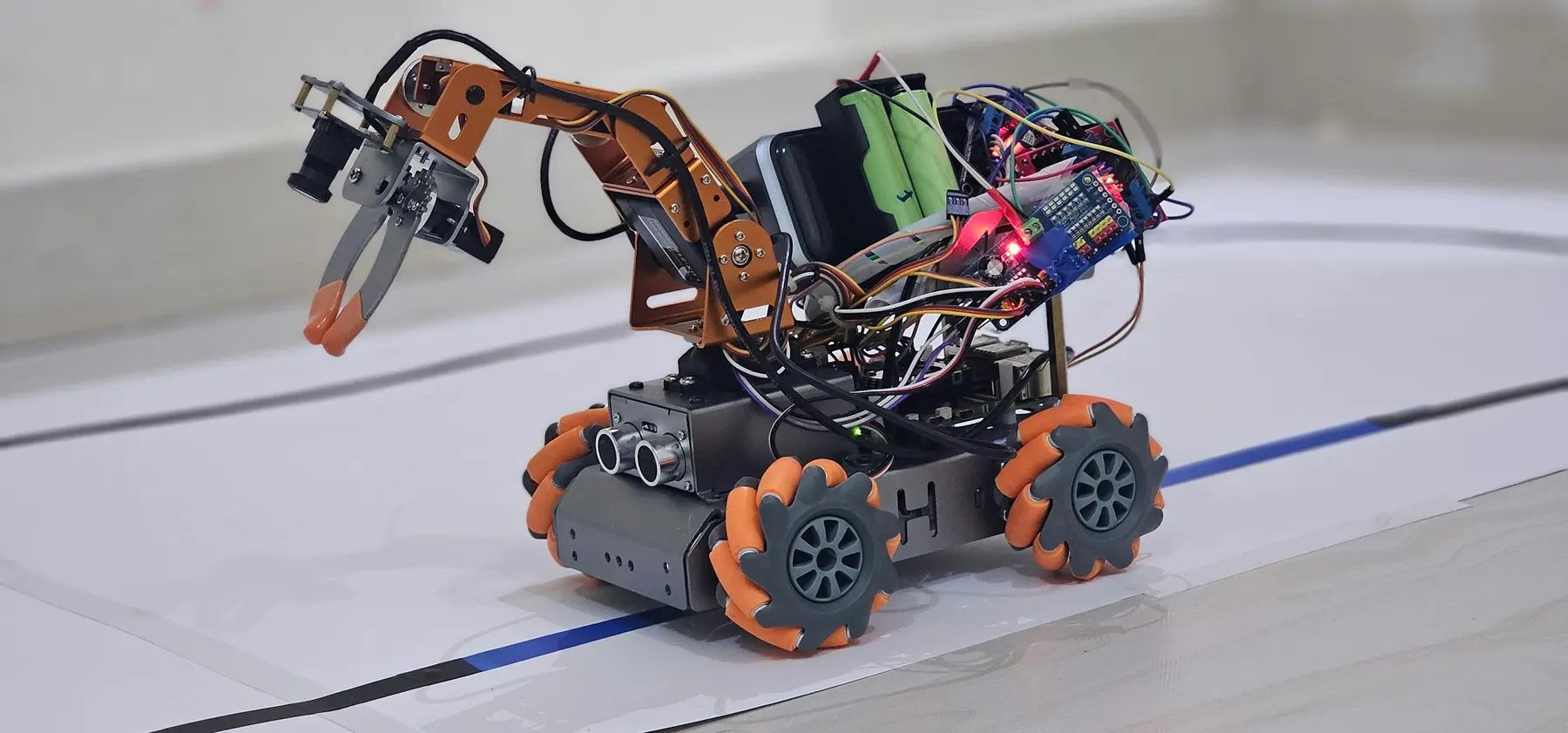
Control & evaluate.Four-Joint Robotic Arm
Multi-joint control, vision and language model evaluation, and command safety. Showcase build: a supervised, vision-guided robotic arm with an independent stop path.
- 16 projects8 robotics, 4 AI, 4 integrated
- 20 to 80Sessions by plan
- Python + ArduinoMain language
- Supervised linkAI to hardware
What students do, and what they prove.
Four-Joint Robotic Arm
A supervised, vision-guided robotic arm with an independent stop path.
Learning check. Run a supervised arm task, measure repeatability and document how AI failures are handled.
Individual check. Every learner, on their own: “Explain an interlock.”
Entry task
Write a function, read a CSV, test a classifier and calibrate one servo.
Robotics core
Multiple servos, joint limits, joystick modes, repeatability, interlocks and bounded commands.
AI layer
Computer vision, model evaluation, error trade-offs, simple language models and knowing when to abstain.
Code & tools
Python with structured Arduino C/C++; optional JavaScript interface. Arduino IDE, Python + scikit-learn, Local model viewer, HTML/CSS (optional).
Cross-subject link
Angles, coordinates, measurement error and confusion matrices.
Scaffolding
Start with a one-joint simulation. Physical arm work follows a mechanical and power sign-off.
How AI meets hardware here
AI runs on the laptop and sends only validated position names, never free-form commands.
Sixteen projects, four blocks of twenty sessions.
Each block follows the same pattern: two builds, one AI project, then one integrated project. Open any project to see its five sessions.
- RRobotics
- AAI
- IIntegrated
- 01Ask & understand · Week 1Power budget and joint limits
- 02Build & design · Week 1Connect one unloaded servo safely
- 03Implement · Week 2Use functions for bounded positions
- 04Test & improve · Week 2Test startup, stops and repeated positions
- 05Explain & reflect · Week 3Write a safe setup checklist
UNO, one servo, external supply, pointer, protractor
Five safe positions; no stall or brownout.
A physical circuit, sensor or mechanism, built and tested on the bench.
- 06Ask & understand · Week 3Analog input and dead zones
- 07Build & design · Week 4Map joystick axes to safe angles
- 08Implement · Week 4Control one/two joints with a mode button
- 09Test & improve · Week 5Test disconnected and extreme inputs
- 10Explain & reflect · Week 5Explain the control mapping
UNO, joystick add-on, one/two servos, approved supply
Extreme inputs and five repeated positions; never exceed calibrated bounds.
A physical circuit, sensor or mechanism, built and tested on the bench.
- 11Ask & understand · Week 6Choose two object states and unknown
- 12Build & design · Week 6Create a balanced non-personal image set
- 13Implement · Week 7Train a local/browser classifier
- 14Test & improve · Week 7Evaluate background and orientation changes
- 15Explain & reflect · Week 8Document false accepts and false rejects
Computer, objects, Teachable Machine or local scaffold
Twenty held-out objects/images across two conditions.
A model, an evaluation study or an AI-checking workflow.
- 16Ask & understand · Week 8Translate model labels to named safe poses
- 17Build & design · Week 9Define human approval and neutral behaviour
- 18Implement · Week 9Test label mapping on LEDs or one joint
- 19Test & improve · Week 10Add a reviewed serial link only after validation
- 20Explain & reflect · Week 10Demonstrate low-score and link-loss cases
P01/P03, computer, optional reviewed USB bridge
Twelve messages including unknown, low-score and stale cases.
A laptop model sends named commands only after bench tests, with a simulator as fallback.
- 21Ask & understand · Week 11Gripper geometry and pinch zones
- 22Build & design · Week 11Choose a lightweight soft object
- 23Implement · Week 12Program bounded open/close positions
- 24Test & improve · Week 12Test gentle handling and repeated release
- 25Explain & reflect · Week 13Record object-size limits
Gripper/frame add-on, suitable servo, external supply
Five pick/release trials; hands outside the pinch area.
A physical circuit, sensor or mechanism, built and tested on the bench.
- 26Ask & understand · Week 13Joint naming and mechanical order
- 27Build & design · Week 14Assemble the arm with power disconnected
- 28Implement · Week 14Calibrate each joint individually
- 29Test & improve · Week 15Test sequences without payload
- 30Explain & reflect · Week 15Publish a joint/pin map
Arm frame, four suitable servos total, controls, rated supply
Each joint tested separately; no arm motion before signed inspection.
A physical circuit, sensor or mechanism, built and tested on the bench.
- 31Ask & understand · Week 16Confusion matrix and class balance
- 32Build & design · Week 16Read actual/predicted labels
- 33Implement · Week 17Calculate per-class error counts
- 34Test & improve · Week 17Compare thresholds and abstention rate
- 35Explain & reflect · Week 18Explain the cost of different mistakes
Local Python, P03 prediction CSV
Check counts by hand; use a fixed held-out set.
A model, an evaluation study or an AI-checking workflow.
- 36Ask & understand · Week 18Define two safe bins and a neutral state
- 37Build & design · Week 19Map classified objects to named poses
- 38Implement · Week 19Require approval before each sequence
- 39Test & improve · Week 20Test unknown objects without moving the arm
- 40Explain & reflect · Week 20Record success, overrides and failures
P06 arm, P03 model, reviewed bridge; manual fallback
Ten soft-object trials; low score leads to no motion.
A laptop model sends named commands only after bench tests, with a simulator as fallback.
- 41Ask & understand · Week 21Flex sensing versus machine learning
- 42Build & design · Week 21Build a safe analog divider
- 43Implement · Week 22Map input to one bounded joint
- 44Test & improve · Week 22Test extremes and loose connections
- 45Explain & reflect · Week 23Explain why analog gesture mapping is a rule
Flex sensor add-on, divider resistor, servo rig
Five bends and disconnected input; no physical strain on the sensor.
A physical circuit, sensor or mechanism, built and tested on the bench.
- 46Ask & understand · Week 23Independent obstacle interlock
- 47Build & design · Week 24Add distance or IR input
- 48Implement · Week 24Prevent movement in an unsafe model zone
- 49Test & improve · Week 25Test override policy and sensor failure
- 50Explain & reflect · Week 25Explain separation of AI and safety logic
Arm, HC-SR04/IR, stop control, approved power
Five blocked/unblocked trials and invalid-sensor test.
A physical circuit, sensor or mechanism, built and tested on the bench.
- 51Ask & understand · Week 26Intent labels and non-personal text
- 52Build & design · Week 26Train on a small classroom command set
- 53Implement · Week 27Test paraphrases and unknowns
- 54Test & improve · Week 27Map labels to permitted named actions only
- 55Explain & reflect · Week 28Document when to ask a person
Local Python, synthetic command examples
Twenty held-out phrases with at least five unknowns.
A model, an evaluation study or an AI-checking workflow.
- 56Ask & understand · Week 28Define a command schema
- 57Build & design · Week 29Validate allowed pose names and required approval
- 58Implement · Week 29Show a preview before movement
- 59Test & improve · Week 30Test bad data, injection-like text and link loss
- 60Explain & reflect · Week 30Export an auditable command log
P11 model, local console, arm or LED simulator
Fifteen cases including malformed commands; invalid input produces STOP.
A laptop model sends named commands only after bench tests, with a simulator as fallback.
- 61Ask & understand · Week 31Arrays of named poses
- 62Build & design · Week 31Store a short bounded movement sequence
- 63Implement · Week 32Replay with non-blocking state logic
- 64Test & improve · Week 32Test cancel and restart between poses
- 65Explain & reflect · Week 33Measure repeated placement error
Four-joint arm, buttons, measured work area
Five replays; emergency power isolation remains accessible.
A physical circuit, sensor or mechanism, built and tested on the bench.
- 66Ask & understand · Week 33Design mode priority
- 67Build & design · Week 34Integrate joystick, replay and sensor interlock
- 68Implement · Week 34Program safe mode transitions
- 69Test & improve · Week 35Test reset and lost-input behaviour
- 70Explain & reflect · Week 35Write a one-page operator guide
Arm, joystick, buttons, sensors, approved power
Eight transitions, reset and stop tests.
A physical circuit, sensor or mechanism, built and tested on the bench.
- 71Ask & understand · Week 36Specify a repeatable model-report workflow
- 72Build & design · Week 36Package instructions, examples and validation tests
- 73Implement · Week 37Run on two model-result files
- 74Test & improve · Week 37Review dependencies and permissions
- 75Explain & reflect · Week 38Document a reproducible version
Local files; teacher-managed Skills demo optional
Two valid files and two malformed inputs; no external write access.
A model, an evaluation study or an AI-checking workflow.
- 76Ask & understand · Week 38Define one constrained sorting task
- 77Build & design · Week 39Combine perception, approval, poses and interlock
- 78Implement · Week 39Run fixed evaluation trials
- 79Test & improve · Week 40Investigate failures and model/robot disagreement
- 80Explain & reflect · Week 40Present model card, circuit map and limitations
Expanded arm kit, computer, object model, reviewed bridge
Ten mission trials plus stop, uncertainty and disconnect tests.
A laptop model sends named commands only after bench tests, with a simulator as fallback.
Class 10 adds one more layer of judgement.
Multi-joint motion and command validation
Vision and language evaluation, abstention
Python plus structured control code
Versioned instructions, examples and validation scripts.
Sandboxed tools, allow-listed actions, human approval.
A command and rejection test log.
 For school leaders
Bring Class 10
to your school.
Start with the four Discovery projects for Class 10 (20 sessions), review the evidence together, then extend to Builder or Innovation.
- Prospectus and class-wise plan
- Kit and readiness check
- Pilot one class first
- Evidence at every milestone
Let's plan your pilot.
Share a few details and we will send the right plan for your classes.